Bearly takes the meeting notes
Meetings and Recordings records online calls, in-person conversations, and voice notes with a live transcript, named speakers, summaries, and a chat that starts from the transcript.

Today we're introducing Meetings and Recordings: record a meeting, a call, or a voice note in Bearly and watch the transcript arrive while people are still talking. When you stop, the audio and transcript are saved to your account, ready to name speakers, summarize, export, or hand to a chat.
The transcript happens during the meeting
Open Meetings and Recordings in the sidebar and choose what you're recording. On the desktop app, Online meeting records the call and your voice together — Zoom, Teams, or anything else playing on your computer. In person or voice note records the room through the microphone and works on web and mobile too.
Select Start recording and the transcript fills in as people speak. Bearly separates the voices as it listens; name each speaker once and every matching turn updates, including the ones already on screen. It also proposes a title from the first minutes of conversation — and if you type your own, it stays.
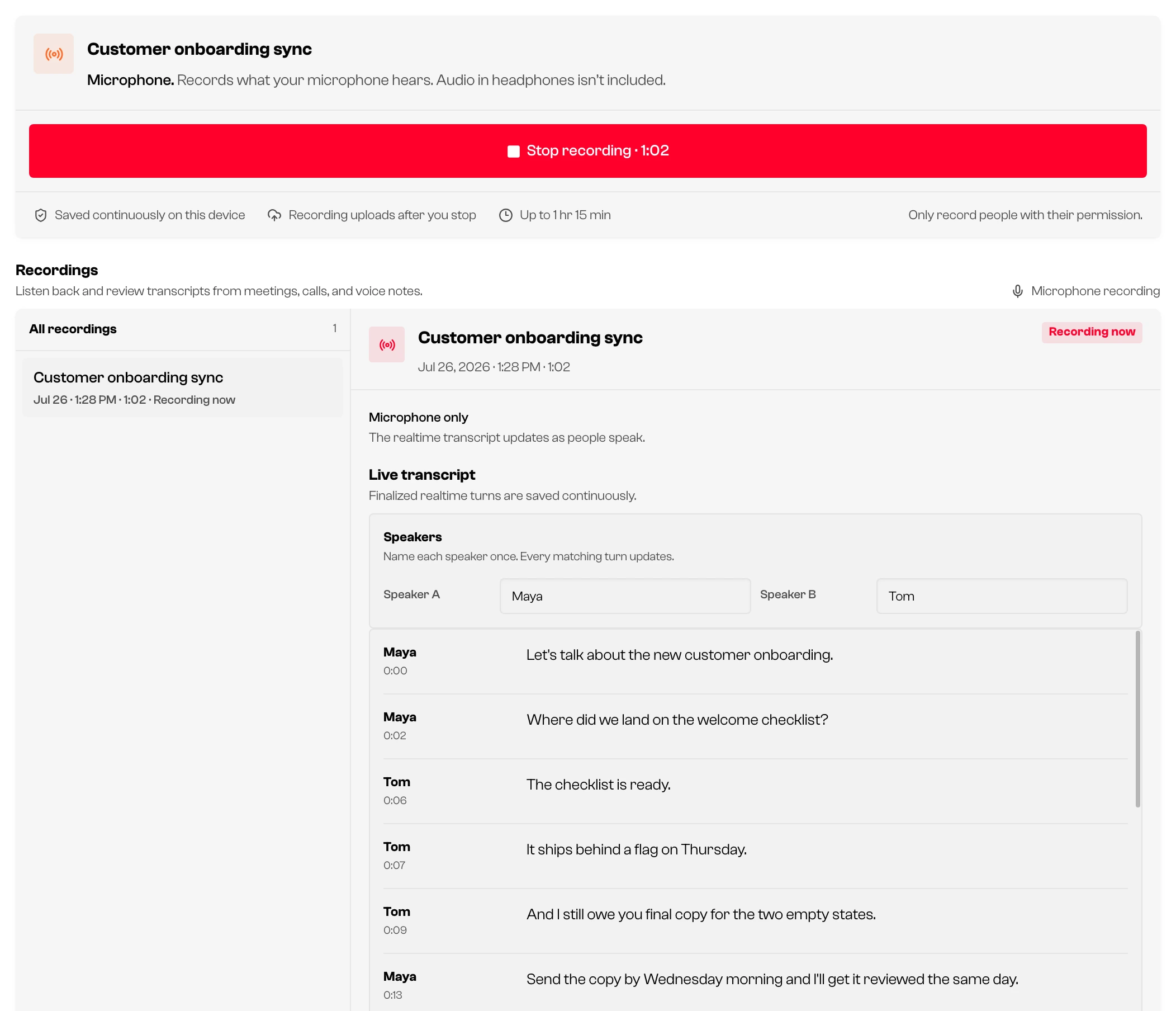
You don't have to babysit the page. The recording continues while you work elsewhere in Bearly, with the latest transcript line and a Stop control in the sidebar. Audio is saved continuously on your device while you record, then uploads to your account when you stop.
Stop, and the notes are ready
The moment you select Stop recording, the transcript is there — no waiting to see what was said. In the background, Bearly uploads the audio and replaces the live transcript with a more accurate final pass.
From any recording you can:
- Create summary — an overview with key points, decisions, action items, and open questions, saved with the recording.
- Speaker labels — Bearly automatically listens across new recordings to tell voices apart more accurately. Older recordings may show Improve speaker labels for the same review. Names you typed carry over.
- Copy the transcript as plain text, with speaker names, or with names and timestamps — or download it as a
.txtfile. - Chat with transcript — opens a new chat with the transcript attached, ready in the composer. Nothing is sent until you send a message, so you can ask for a recap, draft the follow-up, or pull out just your action items.
That last one is why recording lives inside Bearly instead of a separate notetaker: the transcript lands where your work already is, with the same chats, projects, and models.
Built to not lose the meeting
A recording can run up to 1 hour 15 minutes; at the limit Bearly stops and keeps everything captured. If you reach your usage limit mid-meeting, the live transcript pauses and the audio keeps recording. If the upload can't finish — spotty Wi-Fi, a closed laptop — the recording stays safe on the device that made it, with a retry button in its detail pane. And when only one voice is in the room, the recording reads as a voice memo: no speaker labels, just clean text.
Recording other people requires their permission. Laws vary by place, and the recorder shows that reminder whenever you record.
Available now
Meetings and Recordings is available on web, desktop, and mobile. Computer-audio capture — recording the other side of an online call — needs the desktop app on Windows or macOS; everywhere else records through the microphone. Team administrators can turn the feature off for managed teams in the policy editor.
Already have a recording as a file? Attach it to a chat and Bearly transcribes it there — Meetings and Recordings is for the conversations that haven't happened yet.