Introducing People Search
People Search makes sure it has the right person before researching anyone, and shows where every fact came from.

People Search is available today in every Bearly chat, on the Analyst plan.
Ask about someone you're about to meet, or a guest you're about to book. Type /people-search, or just ask in plain words. Bearly reads their public work and writes it up for you: current role, career history, writing and talks, public accounts, with a source and a date on every claim.
Before any of that, though, it checks one thing with you: whether it found the right person.
The right person comes first
Most people research goes wrong before it starts, because names are shared. Ask about a "Jack Johnson in California who sings" and you'll find five working musicians. Research the wrong one, and everything that comes back is about a stranger.
So Bearly searches first, then shows you who it found. Each candidate comes with a photo, a headline, and a plain reading of the details you gave: the role matches, the city doesn't, the school couldn't be checked. There are no match percentages. The public web doesn't support that kind of precision, so Bearly doesn't pretend to.
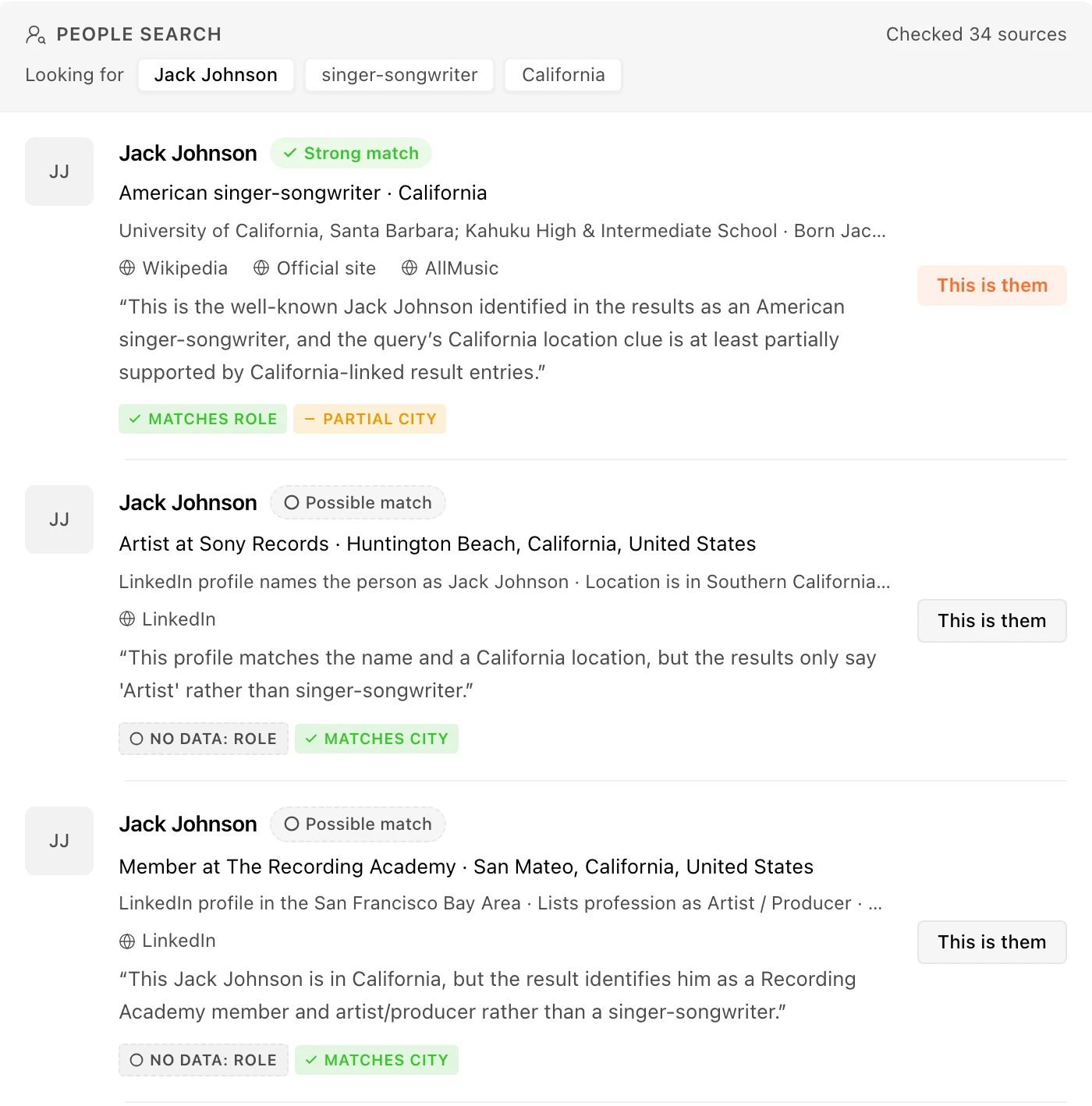
If the right person isn't in the list, add a detail (an employer, a city, a profile link) or compare candidates side by side. Bearly never decides on its own that a candidate is the one you meant. Even when you hand it a profile link that matches exactly one, it confirms with you before doing anything more.
What comes back
Once you confirm, Bearly shows you the estimated cost, then builds the brief: current role, employer, and location, the person's work and ideas, their public presence, and a short write-up. Every claim carries a citation that opens the source it came from, with a date.
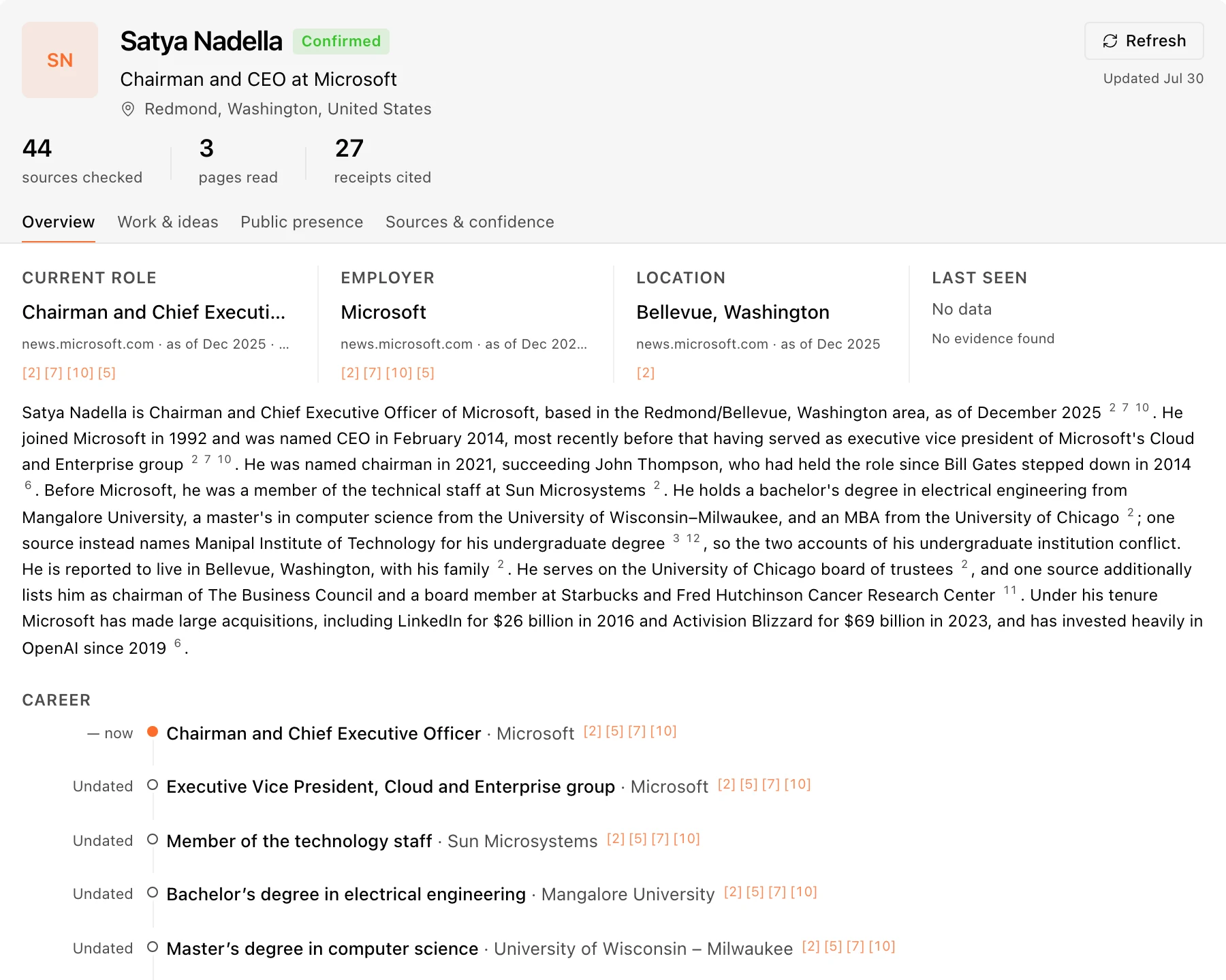
When sources disagree, the brief says so. A profile that says San Francisco and a recent post from New York both stay visible, each with its own date, marked as conflicting. Bearly doesn't quietly pick one.
If a search comes up empty (no public GitHub, say), the brief says that too, which is often worth knowing on its own. And when you come back later, Refresh re-runs the research and lists what changed since you last looked, instead of replacing it.
When public pages point to a way of reaching the person, the brief includes it, masked until you choose to reveal it, with a plain note about what was and wasn't verified.
Public records stay separate
A brief never quietly includes a background check. On the record is its own section at the bottom. It searches US criminal and corrections records, runs only when you ask, and shows the price before it starts.
What comes back is compared with the person you confirmed, not just the name. A record that shares nothing but a name is kept in its own unverified group, and when no record could be tied to the person, the check says exactly that. Adding a date of birth helps: a record that matches on name and date of birth is a different thing from one that matches on name alone.
Coverage is US jurisdictions only. And the results are for personal, informational use, not for decisions about employment, housing, credit, or insurance. The product says so wherever records appear.
Where it fits
This homework was always possible by hand: a dozen open tabs, a folder of links, no record of where any fact came from. People Search does the same reading in one place and keeps the sources attached, so when a claim really matters, you can open the page it came from and check.
It reads public sources only, and it researches one person at a time.
Team admins can turn People Search off for their workspace, or keep it while turning off contact routes or records checks, under Teams → Policies.