ChatGPT vs Claude vs Gemini vs Grok, on your own question
Benchmarks can't tell you which model handles your work. Council of Experts asks several models the same question side by side and shows where they split.

Council of Experts sends one question to several models at once and gives each answer its own tab, so you can compare GPT, Claude, Gemini and Grok models on your own work instead of someone else's benchmark. A synthesis then reads the answers, says where they agree and where they split, and tells you which one it would use. Type /council in a chat on a Pro plan or higher.
Why your own question
Most comparisons of ChatGPT, Claude and Gemini rank the models on benchmarks and sample prompts. That tells you something about the models. It can't tell you how they handle your brief, and it can't show you a problem in the brief itself. Sometimes that problem only appears when two careful readers disagree.
One headline, four answers
We asked a council to fix a weak homepage headline:
We sell invoicing software to finance teams at 50 to 500 person companies. Our homepage headline is: "Revolutionize your AP workflow with AI-powered magic." Rewrite it so a finance manager knows within five seconds what the product does. Each expert: one headline under 12 words and one sentence on why it works. Then tell me which headline you would ship.
The experts were Sonnet 5, GPT 6 Sol, Gemini 3.1 Pro and Grok 4.7. Opus 5.5, the model selected in the chat, wrote the synthesis.
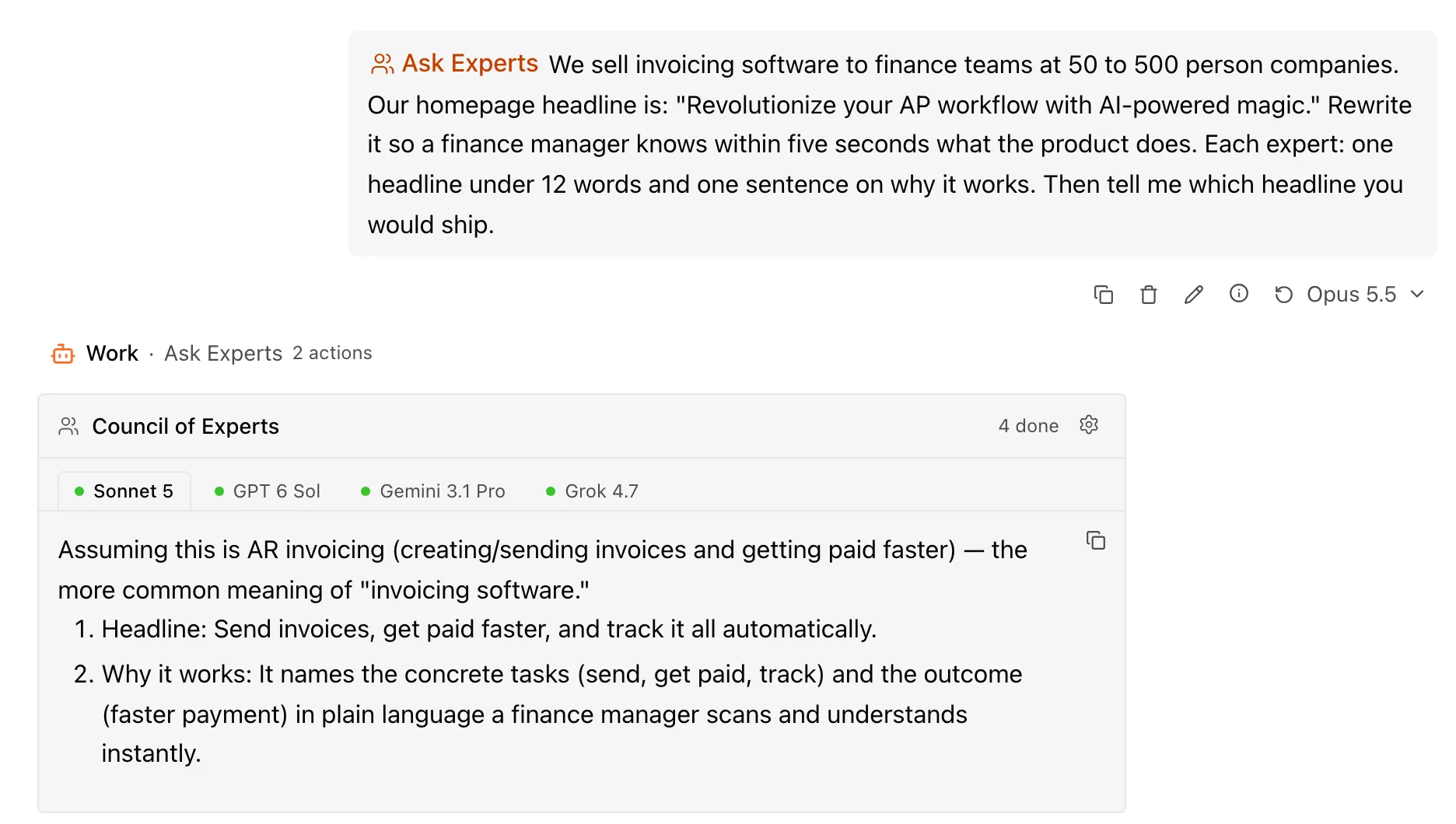
Their headlines:
- Sonnet 5: "Send invoices, get paid faster, and track it all automatically."
- Grok 4.7: "Send invoices and get paid without chasing customers."
- GPT 6 Sol: "Review and approve supplier invoices without the back-and-forth."
- Gemini 3.1 Pro: "Automate accounts payable and process vendor invoices without manual data entry."
All four are clearer than the original. They also describe two different products. Sonnet 5 and Grok 4.7 read "invoicing software" as billing customers. GPT 6 Sol and Gemini 3.1 Pro read it as paying suppliers, which is what "AP" in the old headline means. Sonnet 5 stated its assumption at the top of its answer; the others simply picked one.
The synthesis led with the split: "Settle this before you pick a headline, because a finance manager will spot the mismatch right away." Because the original headline says AP, it recommended Gemini's line, and it explained why that beat GPT 6 Sol's shorter one, which covers only approvals. If the product bills customers instead, it said to ship Grok's. It also suggested moving the AI claim into the subheadline.
Any one of these models, asked alone, would have handed back a confident headline for one of the two products. Putting them side by side is what exposed the ambiguous word.
How the synthesis reads the answers
The synthesis gets the answers as Expert A, B, C and D, in shuffled order and without model names, so it weighs what each answer says rather than which model said it or where it came in the list. The tabs keep the real names, so you can check who wrote what.
Agreement isn't proof. Several models can repeat the same mistake, and in our test of five-model agreement, unanimous answers were reliable but covered fewer questions than the best single model answered on its own. Treat a council as a comparison. Read the disagreements, and ask for sources when a fact matters.
Pick the lineup
After your first council, select the gear on the panel to open Council settings. Under Council models, choose two to five experts. The change applies to future councils, and the list follows your plan and any model policy on a team account.
For a quick check between two models, you don't need a council. Open the model name beside Rerun under your message, choose another model, and move between the two answers with Previous version of query and Next version of query.
What it uses
A council runs several models and then a synthesis, so it uses more of your plan allowance than a single reply. How much depends on the lineup, the length of the answers and any extra work the question needs.
Council of Experts is available on Pro and higher plans. The Council of Experts guide covers the settings and what to do when an expert fails.