Bearly interprets a conversation out loud
Two people, two languages, one device: each person hears the other in their own language, and both versions of every line are written into the chat.
Bearly can now interpret a spoken conversation between two people. Ask in a chat, for example "Interpret for me, English and Spanish", and select Start interpreting on the card that appears. Each of you talks in your own language. Bearly says every line aloud in the other language and writes both versions into the chat as you go. It works in the web app, in phone browsers, and in the desktop app, with 78 languages to choose from.
A session, start to finish
The card opens with your language on one side and the other person's on the other. If Bearly has them the wrong way round, Swap languages fixes it, and you can pick a different language from the list before you start. Bearly doesn't charge anything until you select Start interpreting.
Once it's running, there's nothing to press between turns. Put the device between you and talk. The card highlights whoever is speaking, Bearly speaks each line in the other language, and the line appears in the card in both. Mute microphone pauses without ending the session, and Stop interpreting ends it. Lines Bearly was still saying finish first.
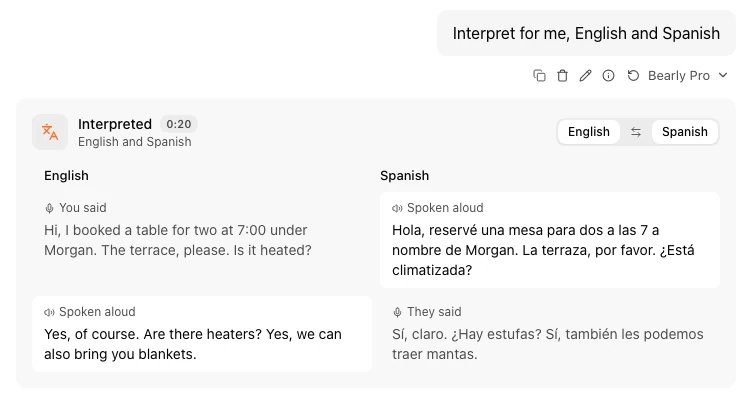
On a computer the card shows the two languages side by side: what each person said, marked You said or They said, next to what Bearly said aloud. On a phone it reads like a message thread instead. Each line is shown large in the listener's language with the original underneath, and the Mute and Stop buttons stay at the bottom of the screen, so the person across from you can read along.
The conversation stays in the chat
When you stop, the card stays in the chat with every finished line in both languages. Because it's part of the chat, you can keep working from it.
Say a contractor comes to look at a leak in your bathroom ceiling, and they're more comfortable in Spanish. You talk through what's wrong, what it will cost, and when they can start. Afterwards, type:
"From the interpreter transcript, list what we agreed: the work, the price, the start date, and anything still open. Write it in English, then in Spanish so I can show it to the contractor."
Bearly writes the list from the saved lines. You can follow up the same way: draft a message to confirm the start date, or ask what you forgot to ask.
Where the audio goes
Interpreter audio goes to a speech translation model that runs with zero data retention, so the model's provider keeps nothing once the session ends. That holds for every session, whether or not you've turned on Zero Data Retention only. Bearly doesn't record the audio. The transcript is saved in the chat, like the rest of the conversation, and when you ask about it later, the chat's model reads it like any other message.
Limits worth knowing
- Two languages per session. Once people have spoken, the pair is fixed; ask for a new session to change it. Swap languages still works mid-session, because it only changes which side is you.
- The written original can come up short. Sometimes the line under a translation stops before the speaker did. The spoken translation isn't affected.
- One device, one speaker. Bearly plays both directions aloud on the same device, so use its speaker rather than headphones.
- Session length. A session has the same usage limit as a voice call, which in ordinary conversation is about 20 minutes on Pro and about 5 on Free. It also ends after 60 minutes, or after 10 minutes muted. Ask for a new one to keep going; the earlier card stays in the chat.
- Where it runs. The web app, including phone browsers and Firefox, and the desktop app.
- Cost. Sessions are billed by the minute of audio as voice usage on your plan, the same way voice calls are.
On a team plan, admins can turn the interpreter off with the Live interpreter control, which also needs Voice to be on.
The Bearly Manual covers every control, message, and limit.