AI flashcards and a study guide from lecture notes
Attach lecture notes or a handout and Bearly builds a study guide and a deck of flashcards you can flip, shuffle and mark as known, in one interactive Page.

Attach your lecture notes, slides or a handout to a Bearly chat and ask for a study guide and flashcards. Bearly reads the file and builds both as a Page, a small interactive tool that opens beside the chat, with cards you can flip, shuffle and mark as known, and the full guide a tab away.
From a handout to a deck
We wrote a three-page statistics handout on confidence intervals, covering what "95% confident" means, the formulas, a worked example and the common mistakes. We attached it as a PDF and sent this to Gemini 3.8 Flash:
These are my notes from this week's statistics lecture. Make a study guide from them: the ideas I most need to understand, the formulas, and the mistakes to avoid. Then turn it into 15 flashcards I can flip through, with a shuffle button and a way to mark the ones I know. Make it a Page.
Less than two minutes later, a Page called Confidence Intervals Study Hub opened beside the chat.
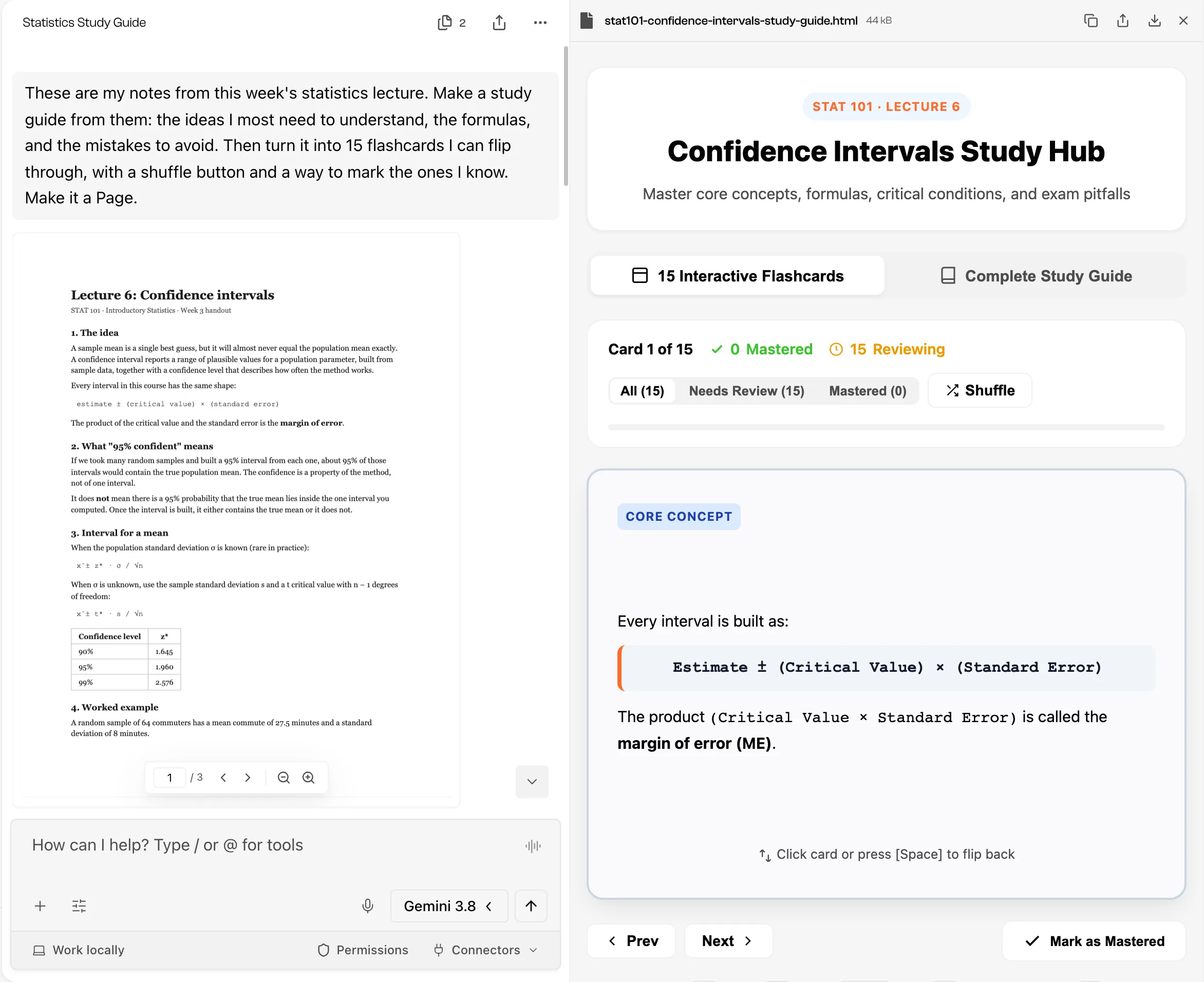
The flashcards tab has the 15 cards, a count of the ones you've mastered and the ones still in review, filters for each group, and Shuffle. The study guide tab turns the handout into sections: the big picture, a cheat sheet of formulas and critical values, what makes an interval wider or narrower, the conditions to check, five exam traps, and the worked example step by step.
We checked every card against the handout. All 15 match it, and between them they cover every section, including the classic misreading: why "there is a 95% probability that the true mean is in this interval" is incorrect. The guide also added a trap the handout doesn't mention, using z* when the population standard deviation is unknown. It's correct, and it's a reminder that the model can bring in material from outside your notes.
Make it yours
The first Page is a starting point. Ask for changes in the same chat and Bearly revises it:
- "Add a ten-question practice quiz that scores me at the end."
- "Make the cards harder: give me a scenario and ask which formula applies."
- "Add a card for every term in bold."
Other ways in
Notes aren't the only source:
- A lecture recording. Type
/transcribe, attach the audio or video, then ask for the study guide from the transcript. - A YouTube lecture. Paste the link and Bearly opens the video in a card with a summary and key moments. When it can read the captions, it saves the transcript to the chat, and the study guide can work from the lecturer's actual words. When it can't, it watches the video instead, so times are approximate and there's no transcript to quote. Check a YouTube talk before you watch it explains the difference, and how the desktop app can get a missing transcript.
Keep it
In the open Page, Download saves the whole thing as one HTML file that opens in a browser, so you can keep it with your course files or send it to a study group.
What you mark as known doesn't stay marked. Choices you make inside a Page are temporary, so the deck starts fresh when you reopen it. If you want to keep only the hard cards, ask Bearly for a new version with just those.
Limits
- Check the cards against your notes before an exam. The model can get a formula wrong, and it can add things your course doesn't cover.
- A Page is one self-contained file. It's good for a deck and a guide, not for tracking your progress across a semester.
- The guide is only as complete as the source. A handout that skips a topic produces a study guide that skips it too.
The Pages guide covers creating, revising and downloading Pages.